
Rebuild, redesign, or refresh? A framework for digital platform decisions

Most teams are aware when their website, portal, or platform has issues. What they don’t always know is the right level of fix.
Getting that diagnosis right matters more than teams often realize.
Overspending on a full rebuild when a redesign would have done the job burns budget and months. Underinvesting in a refresh when the architecture is fundamentally broken just delays the same conversation, at a higher cost. And defaulting to a redesign because “we need to do something about the site” without first understanding what’s actually broken is the most common mistake of all.
The right answer depends on three things: what your business needs, what your platform can actually support, and what the performance evidence is telling you. This framework gives you a clear way to evaluate all three, and get to a decision you can defend.
See the framework at a glance: If you need the short version, this is it. Use the framework below to quickly assess whether the right move is a refresh, redesign, or rebuild. Then keep reading for the nuance behind each decision.
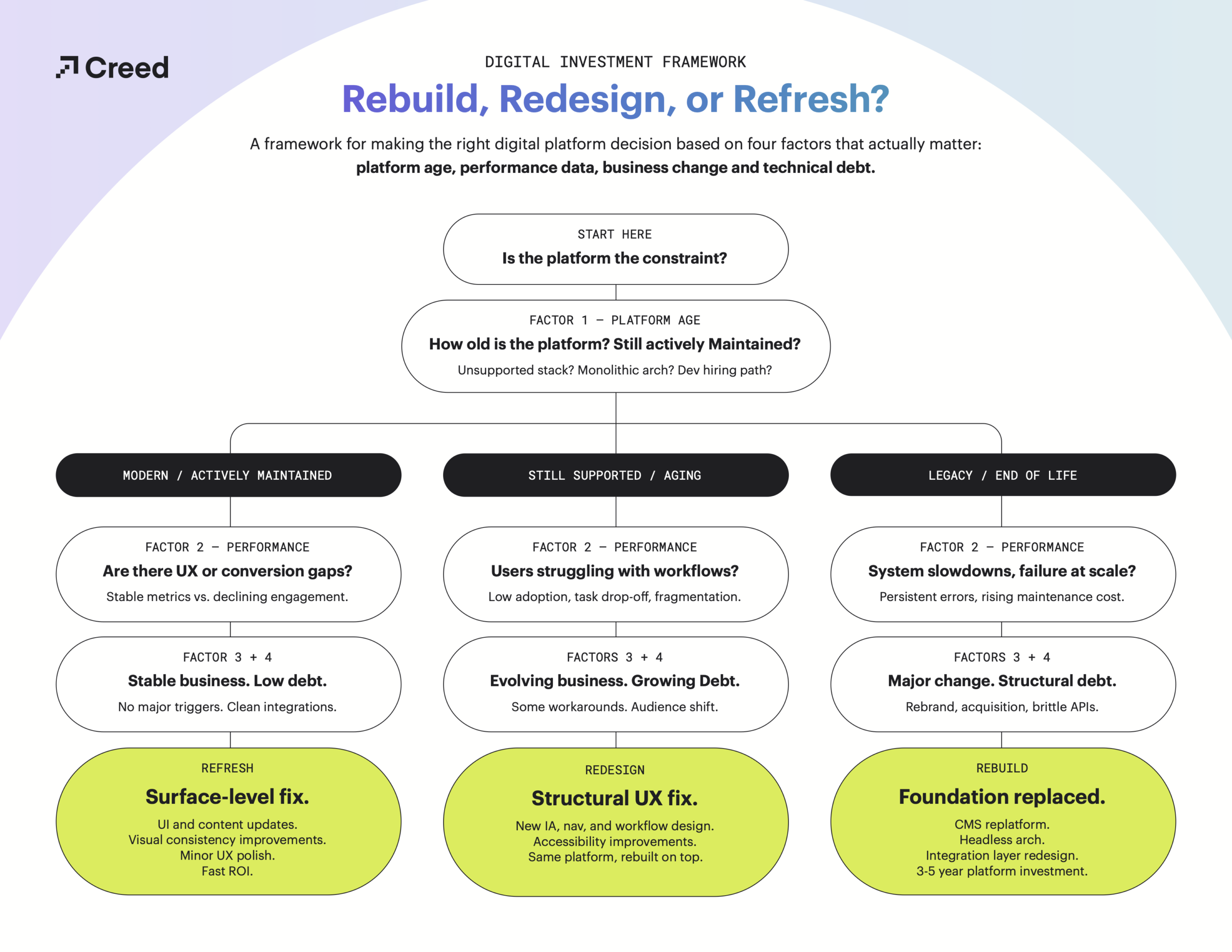
What’s the difference between a refresh, a redesign, and a rebuild?
The difference between these three paths isn’t visual. It’s structural depth and it applies equally to websites, portals, CMSs, and internal tools.
A platform refresh improves how things look and feel without changing the underlying system.
- This might include:
- UI updates
- Content improvements
- Visual consistency across dashboards or portals
- Minor workflow adjustments
- This is the right scope when:
- The platform is stable, users understand how to use it, and the issues are mostly surface-level friction.
A platform redesign goes deeper. It focuses on how users interact with systems, not just how those systems appear.
- This might include:
- Redesigned navigation structures
- Improved information architecture
- Workflow optimization in internal tools
- Better UX across CMS or service platforms
- This is the right scope when:
- Users struggle to complete tasks, adoption is low, or systems feel fragmented and inconsistent.
A platform rebuild is required when the underlying architecture is the constraint.
- This might include:
- CMS or portal replatforming
- Headless architecture migration
- Full backend replacement
- Integration layer redesign
- Performance and scalability engineering.
- This is the right scope when:
- Legacy systems are blocking delivery, technical debt is compounding, or maintenance costs are rising in a way that makes continued investment in the existing platform a bad bet.
The mistake most teams make is treating a system problem as a design problem. A better interface won’t fix structural limitations. That’s not a design question; it’s a diagnosis question.
The 4-factor framework
Before choosing a path, evaluate these four dimensions honestly. Each one tells you something different about where the real constraint lives.
1. Platform age and architecture
Older platforms don’t just look outdated, they restrict change. The visible symptoms are usually slow release cycles, difficulty finding developers willing to work in the stack, and a monolithic architecture that makes any significant update feel like open-heart surgery.
If you’re running an unsupported CMS or framework, the risk isn’t just technical. It’s operational. Every month you stay on an unsupported platform is a month you’re accumulating security exposure that a visual refresh can’t touch.
- What to look for:
- Unsupported or end-of-life platforms.
- Monolithic architecture with no clear path to headless.
- Developer hiring difficulty.
- Release cycles measured in weeks for changes that should take hours.
2. Performance and usage data
Performance should be evaluated across workflows, not just pages. Core web vitals matter, but so do task completion rates, workflow drop-off points, portal adoption, and support ticket volume. A slow website affecting leads is usually a symptom of infrastructure, not design.
Pull the numbers that tell the real story: where do users abandon workflows? Which integrations fail or lag? Where does the gap between user intent and system capability show up most clearly? That data will point you toward the layer where the real problem lives: experience, workflow, or architecture.
- What to look for:
- Persistent performance failures or system slowdowns that reappear after every attempted fix.
- Declining conversion on high-value workflows.
- Support ticket volume that tracks product or content complexity.
3. Business and operational change triggers
Platforms are built to serve a specific business model at a specific moment. When the business changes substantially, the platform rarely keeps pace on its own.
A rebrand, an acquisition, a shift to self-service models, expansion into new markets, a new operating model: these are all moments when the gap between what the platform was built for and what the business now needs becomes structural, not cosmetic. A website redesign strategy should always reflect broader business transformation. When it doesn’t, you end up redesigning the interface around a system that can’t actually support the direction you’re heading.
- What to look for:
- Major shifts in audience, operating model, or product since the platform was last built or meaningfully updated.
- Rebrands or acquisitions where the existing digital environment hasn’t been reconciled.
- Self-service or automation initiatives that the current platform can’t support.
4. Technical debt across systems and integrations
Technical debt becomes most visible in complex platforms and most dangerous in the places between systems. That’s because most platform failures don’t happen inside a single tool. They happen at the integration layer with brittle APIs, manual data transfers between systems, duplicated functionality, inconsistent behavior that no one fully owns.
Ask your team to give you an honest inventory. Not the sanitized version. The real one. How many workarounds exist that everyone knows about but no one has fixed? How often do deployments break something unexpected in production? If the answer to that last question makes the room uncomfortable, the debt is structural.
- What to look for:
- Duplicated functionality across systems.
- Manual data transfer between tools that should connect automatically.
- Slow deployments. Brittle APIs or integrations that fail unpredictably.
- Growing maintenance cost with no corresponding growth in capability.
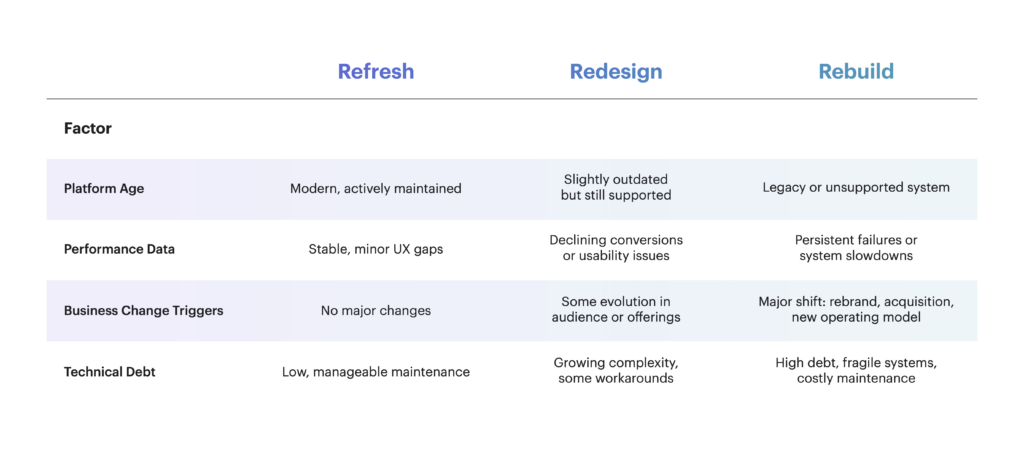
The decision matrix
Use the matrix below as a starting point, not a final answer. The matrix is most useful when it’s applied honestly, which means getting your development team, operations team, and digital leads in the same room before a decision is made.
Creed’s approach
We don’t separate websites, portals, CMSs, or internal tools in how we think about platform decisions, because they’re not separate. They’re part of the same digital ecosystem, and decisions made about one part affect all the others.
A platform modernization strategy should always start by identifying where value is being blocked: experience, workflow, or architecture. That diagnosis drives everything else. Sometimes it points to a refresh. Sometimes a redesign. Sometimes a full rebuild of the system foundation.
The decision is always driven by impact, not scope. And it always starts with an honest assessment before a dollar is committed to execution.
Not sure where your platform falls? Reach out and we’ll help you find out.